PlugAds
Try it freeTry free

For businesses that advertise on Google Ads Meta

Stop wasting ad budget. You just approve.

PlugAds checks your Google Ads and Meta every day like a strong in-house marketer: it finds where money goes to waste and prepares the exact fix. Nothing changes in your ad accounts until you tap “Approve”.

Free plan, no card. Ad accounts from the “Start” plan, 1,190 ₴ a month.

PlugAdsApprovals Waiting: 3

Google Ads · Search · “Websites — hot”

Waiting for you Applied

Add 3 negative keywords −106 ₴ a week

Now: your ad shows for

  • “free website”41 ₴
  • “web designer jobs”38 ₴
  • “how to make a website yourself”27 ₴

After approval

  • + “free” (phrase)
  • + “jobs” (phrase)
  • + “yourself” (phrase)
Why
106 ₴ in 7 days, 23 clicks, 0 leads.
Risk
Low: no search that brought you leads contains these words.
ApproveReject

Applied in Google Ads and logged. Undo

  • Nothing changes without your “Approve”
  • Morning report and approvals in Telegram
  • Official Google and Meta access, revocable anytime

What it finds

Four places where ads quietly waste money

PlugAds checks them every day and shows the loss in hryvnias, with a fix you can approve, not another chart.

Searches that aren’t yours

“free website”41 ₴ · 0 leads

“web designer jobs”38 ₴ · 0 leads

PlugAds: prepares negative keywords for your approval. Searches that brought leads are never blocked.

Ads at night

00:00–07:006 clicks · 0 leads · ≈ 300 ₴/week

PlugAds: proposes an ad schedule, so the daily budget works in the daytime.

Budget spent, no leads

“Websites — hot”96% of the daily budget · 0 leads

PlugAds: messages you in Telegram as soon as a campaign spends 80% of its daily budget without a single lead.

Low Quality Score

“website price”Quality Score 2/10

“website cost”Quality Score 3/10

PlugAds: shows the keywords that make you overpay per click and what to fix: usually a separate landing page for those searches.

Plus one-hour click spikes with no leads, and devices that eat the budget without a single contact. Every proposal comes with the reason, the expected effect and the risk.

How it works

Money, site, leads and competitors in one panel

Each screen answers one question and ends with an action. These are real panel screens with demo data; the panel is in Ukrainian.

Screen «Схвалення» (Approvals)

Every change is a card with the reason, the effect and the risk

You see what’s there now and what will be there after approval. Exactly what you saw is applied, and only after “Approve”.

  • Proposals from PlugAds, the radar, the guardian and the assistant land in one queue
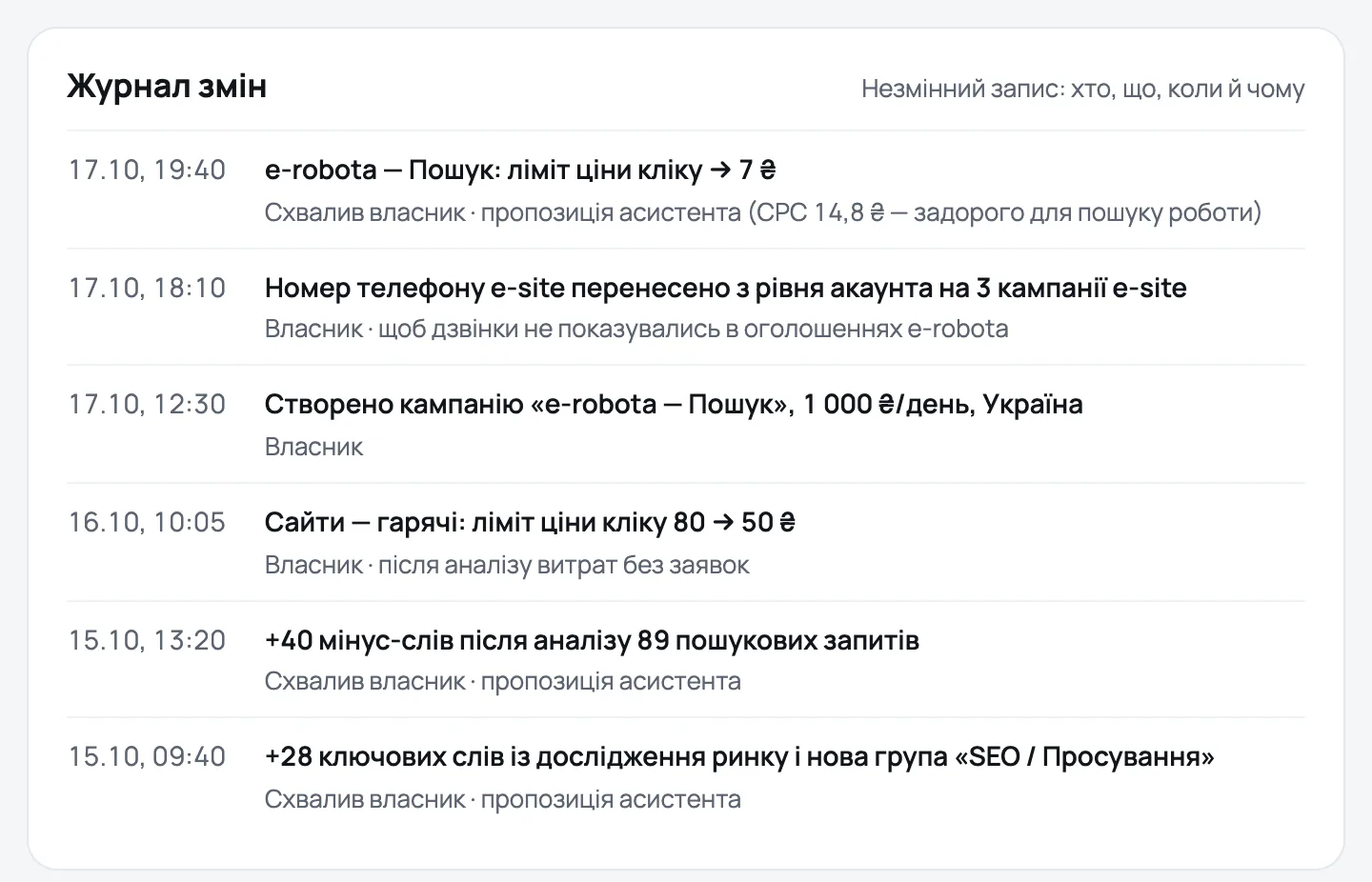
  • Change log: who changed what, when and why
  • Negative keywords, budgets, bids and pauses can be undone for 30 days
The «Схвалення змін» screen: a card «Додати 3 мінус-слова з пошукових запитів» with Now and After approval, why, expected effect and risk, and the buttons «Схвалити», «Відхилити», «Змінити».
All 17 screens of the panel

Every day

  • Overview what needs your attention today
  • Inbox every lead with its ad source
  • Approvals changes waiting for you, and the log

Ads

  • Campaigns spend, searches and keywords, today’s pace
  • Creatives ad texts and banners that work, yours and competitors’
  • Budget and forecast how much you need for the leads you want

Site

  • What stops leads where visitors drop off, and the fix
  • Session replays paid clicks without a lead, form errors, heat maps

Market

  • Competitor radar their ads, prices and sites, and your move
  • Niche comparison your Google Ads numbers against anonymous niche medians

Protection

  • Guardian site, forms, budget and night spend, around the clock
  • Account doctor everything that can stop your ads
  • Contractor control who changed what, and what it cost

Settings

  • AI manager answers new clients in Telegram and Viber
  • Site tag one line of code, GTM, WordPress or Shopify
  • Connections Google Ads, Meta, Analytics, Telegram, AI assistants
  • Credits and plan balance, top-ups and the usage log

Telegram

Morning report and approvals, right in Telegram

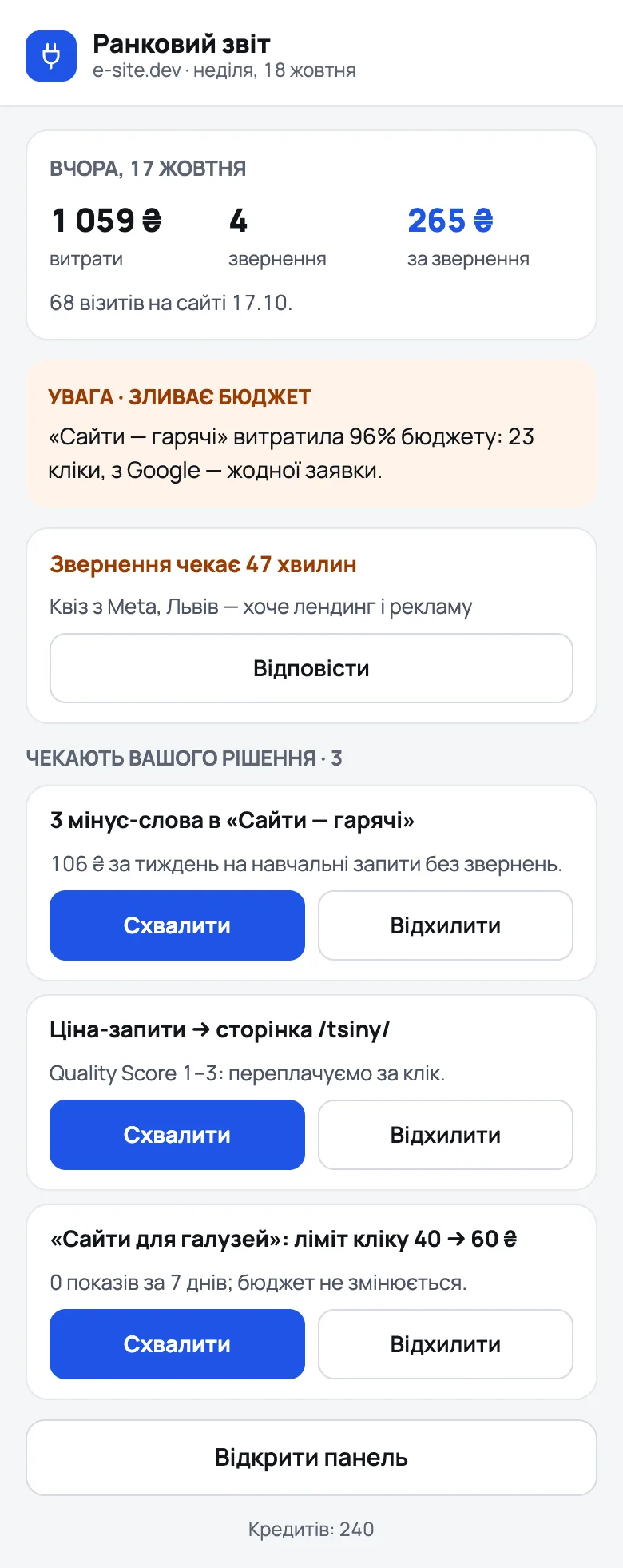
At 9:00 the PlugAds bot tells you how yesterday went and what’s waiting for your decision. You can approve from your phone without opening a laptop.

  • Yesterday’s spend, leads and cost per lead
  • Alerts when a campaign burns its budget, a client has waited 15 minutes or a call was missed
  • “Review and approve” opens a mini app inside Telegram: approve, reject, see new leads
The PlugAds mini app in Telegram, «Ранковий звіт»: yesterday 1 059 ₴ spent, 4 leads, 265 ₴ per lead; a budget alert; a client waiting 47 minutes; three changes with «Схвалити» and «Відхилити».
@plug_ads_bot · mini app in Telegram

Safety

Your ad accounts stay in your hands

Your accounts spend real money, so PlugAds is built to propose, not to act on its own.

  • Nothing without “Approve”The assistant only proposes. A Google Ads change is approved by the person who connected the account; the AI can’t approve anything.
  • Exactly what you sawBefore it’s applied, the change is rebuilt. If the account changed in the meantime, it’s marked out of date instead of applied. Unanswered proposals expire in 24 hours.
  • A budget cap per accountA change above your daily cap is refused, even after approval.
  • Pause, never deletePlugAds has no tool to delete campaigns or ads. New campaigns are created paused.
  • A log and an undoEvery action is logged. Negative keywords, budgets, bids and pauses can be rolled back for 30 days, again through “Approve”.
  • Official accessGoogle and Meta sign-in (OAuth); tokens are encrypted (AES-256-GCM); revoke access at any time.
  • A tag that respects visitorsBefore consent it stores nothing in the browser and sets no cookies; replays only after consent, with typed text hidden; Do Not Track and GPC are honoured.
The «Журнал змін» (change log) in the panel: each entry with the time, what changed and who approved it.

The one thing PlugAds can do in your account on its own: pause your ads while your site is down, and resume them afterwards. This guardian rule is off until you switch it on.

Pricing

Start free. Pay when you connect your ads.

Prices in hryvnias, paid by card through monobank. A year up front is 20% cheaper.

Free

Your site and your leads

0 ₴

no card needed

  • 30 credits a month
  • Tag on 1 site, up to 3,000 sessions a month
  • What stops leads, session replays
  • Inbox and the AI manager
  • No ad accounts: they start with “Start”
Start free

Start

One Google Ads account

1,190 ₴952 ₴/month

billed monthly11,424 ₴ billed yearly

  • 300 credits a month
  • 1 Google Ads account, reports refreshed every 3 hours
  • Approvals, guardian, contractor control, niche comparison
  • Competitor radar, weekly
  • Tag on 1 site, up to 10,000 sessions a month
Try it free

Growth

Google Ads and Meta

3,290 ₴2,632 ₴/month

billed monthly31,584 ₴ billed yearly

  • 1,000 credits a month
  • Up to 3 Google Ads and Meta accounts, refreshed hourly
  • Everything in “Start”, plus Meta
  • Competitor radar, daily
  • 2 sites, up to 50,000 sessions; the tag on your own domain
Try it free

Agency

Agencies and several brands

8,290 ₴6,632 ₴/month

billed monthly79,584 ₴ billed yearly

  • 3,500 credits a month
  • Up to 15 Google Ads and Meta accounts, refreshed hourly
  • Everything in “Growth”
  • Competitor radar, daily
  • 10 sites, up to 250,000 sessions
Try it free

Need more ad accounts? Each extra one is 290 ₴ a month on any paid plan.

“PlugAds credits”: 1 credit = 1 question to the assistant

Credits are spent only on actions you start yourself, and the price is on the button. Background work is free: sync, daily findings, alerts, weekly market monitoring, reports. Monthly credits renew every month; bought credits last 12 months. Actions from 10 credits ask you to confirm first.

Top-up packs: 200 credits — 490 ₴ 1,000 — 1,990 ₴ 3,000 — 4,990 ₴

Prices of actions, in credits
Question to the assistant1
Ad texts2
Competitor ads check2
Keyword research6
Deep campaign audit8
Banners for Facebook and Instagram8
Visibility in AI answers20
Full market analysis60

The AI manager costs 1 credit per conversation, and a call transcript with a summary 1 credit per call. Nothing is charged if the action fails.

FAQ

Questions owners ask first

Can PlugAds change my ads or spend money on its own?

No. The assistant, the radar and the guardian only propose; a change is applied after you tap “Approve”. The single exception is the guardian rule “pause ads while the site is down”, and only if you switched it on. A change above your daily budget cap is refused even after approval.

What access do you ask Google and Meta for, and why?

Google: sign-in (your name and email) and Google Ads API access (adwords), to read your campaigns, search terms and results and to apply only the changes you approve; optionally read-only Google Analytics and Search Console, and Data Manager to send the deals you mark to your Google Ads. Meta: ads_read, ads_management and business_management, for the same reasons. How each permission is used is in the Privacy Policy; you can revoke access at any time.

What do I get on the free plan?

The PlugAds tag on one site (up to 3,000 sessions a month), “What stops leads” and session replays, the inbox and the AI manager, and 30 credits a month. Ad accounts, approvals for ads, the guardian’s fixes and the competitor radar start with the “Start” plan.

What are credits, and how many do I need?

One credit is one question to the assistant; other actions have a fixed price on their button, from 2 to 60 credits. Checks, alerts and reports run in the background for free. If credits run out, buy a pack, or turn on auto top-up with a monthly spending limit.

How do I pay?

By card through monobank: a plan monthly or yearly (−20%), credits in packs. You can cancel the plan at any time; it stays active until the end of the paid period.

I already have an agency or a freelancer. Why PlugAds?

So you can see what they change and what comes of it. “Contractor control” compares the cost per lead before and after each change, and the guardian watches your site and budget around the clock. PlugAds doesn’t touch their access: you decide who can do what.

What does the tag collect? Is recording sessions legal?

Before consent the tag counts visits without cookies or browser storage. Replays and browser ids start only after the visitor agrees in your consent banner (Google Consent Mode, WordPress Consent API and Shopify are supported); typed text, passwords and card fields are never recorded. You decide what to collect on your site; PlugAds processes it on your behalf. Mention the tag in your site’s privacy policy. Details are in our Privacy Policy.

Does it work with Claude or ChatGPT?

Yes, there’s a PlugAds connector for AI assistants (Claude, ChatGPT, Cursor), now in beta. You can ask about your ads in your own AI chat; any change it prepares still waits for your “Approve” in the PlugAds panel.

How do I disconnect and delete my data?

Open app.plugads.io/app/account and tap “Delete my data”, write to privacy@plugads.io, or revoke access in your Google Account or Facebook business integrations. Step by step: the data deletion page.

Is PlugAds affiliated with Google or Meta?

No. PlugAds is an independent product built on the official Google Ads API and Meta Marketing API. You keep full ownership of your ad accounts.

Another question? Write to support@plugads.io; we reply within two business days.

Start with the free plan

  1. 1Sign in with Google
  2. 2Add the tag to your site: one line of code, GTM, WordPress or Shopify
  3. 3Connect Google Ads and Meta when you’re ready (from “Start”)
Try it free